Merge Sort in Java with Example

Merge sort

In computer science, merge sort (also commonly spelled mergesort) is an O(n log n) comparison-based sorting algorithm. Most implementations produce a stable sort, which means that the implementation preserves the input order of equal elements in the sorted output.

Mergesort is a divide and conquer algorithm. Divide and conquer algorithms divide the original data into smaller sets of data to solve the problem.

During the Mergesort process the object in the collection are divided into two collections. To split a collection, Mergesort will take the middle of the collection and split the collection into its left and its right part. For more additional info Learn Java Online

The resulting collections are again recursively splitted via the Mergesort algorithm until they are broke to single element in each collection.

After splitting each collection, mergesort algorithm start combining all collections obtained via above procedure.

To combine both collections Mergesort start at each collection at the beginning. It pick the object which is smaller and inserts this object into the new collection.

For this collection it now selects the next elements and selects the smaller element from both collection by comparing one element from each collection at a time.

The Algorithm:

Merge sort is a “divide and conquer” algorithm wherein we first divide the problem into subproblems. When the solutions for the subproblems are ready, we combine them together to get the final solution to the problem. For more skills Java Online Classes

This is one of the algorithms which can be easily implemented using recursion as we deal with the subproblems rather than the main problem.
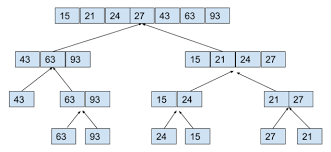
The algorithm can be described as the following 2 step process:

  • Divide: In this step, we divide the input array into 2 halves, the pivot being the midpoint of the array. This step is carried out recursively for all the half arrays until there are no more half arrays to divide.
  • Conquer: In this step, we sort and merge the divided arrays from bottom to top and get the sorted array.
When to use Merge Sort:
  1. Merge sort is used when the data structure doesn’t support random access, since it works with pure sequential access (forward iterators, rather than random access iterators). It’s also widely used for external sorting, where random access can be very, very expensive compared to sequential access.

For example, When sorting a file which doesn’t fit into memory, you might break it into chunks which fit into memory, sort these using independently, writing each out to a file, then merge sort the generated files. For Practical Programming core java online course

  • Also, you can use merge sort when you need a stable sort. It’s very important feature of merge sort.
  • Mergesort is quicker when dealing with linked lists. This is because pointers can easily be changed when merging lists. It only requires one pass (O(n)) through the list.
  • If there is a lot of parallelization occurs then parallelizing Mergesort is simpler than other sort algorithms.

Sorting Array using Merge Sort Algorithm:

You have given an unordered list of integers (or any other objects e.g. String), You have to rearrange the integers or objects in their natural order.

Example:

import java.util.Arrays;

/*
 * Java Program to sort an integer array using merge sort algorithm.
 */

public class Main {

  public static void main(String[] args) {

    System.out.println("mergesort");
    int[] input = { 87, 57, 370, 110, 90, 610, 02, 710, 140, 203, 150 };

    System.out.println("array before sorting");
    System.out.println(Arrays.toString(input));

    // sorting array using MergeSort algorithm
    mergesort(input);

    System.out.println("array after sorting using mergesort algorithm");
    System.out.println(Arrays.toString(input));

  }

  /**
   * Java function to sort given array using merge sort algorithm
   * 
   * @param input
   */
  public static void mergesort(int[] input) {
    mergesort(input, 0, input.length - 1);
  }

 
  private static void mergesort(int[] input, int start, int end) {

    // break problem into smaller structurally identical problems
    int mid = (start + end) / 2;
    if (start < end) {
      mergesort(input, start, mid);
      mergesort(input, mid + 1, end);
    }

    // merge solved pieces to get solution to original problem
    int i = 0, first = start, last = mid + 1;
    int[] tmp = new int[end - start + 1];

    while (first <= mid && last <= end) {
      tmp[i++] = input[first] < input[last] ? input[first++] : input[last++];
    }
    while (first <= mid) {
      tmp[i++] = input[first++];
    }
    while (last <= end) {
      tmp[i++] = input[last++];
    }
    i = 0;
    while (start <= end) {
      input[start++] = tmp[i++];
    }
  }
}

To get in-depth knowledge, enroll for a live free demo on Java Online Training
Understanding ConcurrentHashMap Collections in Java

ConcurrentHashMap is a Map implementation like HashMap and Hashtable, with additional support for concurrency features: Unlike Hastable or synchronizedMap which locks the entire map exclusively to gain thread-safety feature, ConcurrentHashMap allows concurrent writer and reader threads.

That means it allows some threads to modify the map and other threads to read values from the map at the same time, while Hashtable or synchronizedMap allows only one thread to work on the map at a time.

More specifically, ConcurrentHashMap allows any number of concurrent reader threads and a limited number of concurrent writer threads, and both reader and writer threads can operate on the map simultaneously. For more additional info Java Online Course

Reader threads perform retrieval operations such as get, containsKey, size, isEmpty, and iterate over keys set of the map.

Writer threads perform update operations such as put and remove. Iterators returned by ConcurrentHashMap are weakly consistent, meaning that the iterator may not reflect latest update since it was constructed.

An iterator should be used by only one thread and no ConcurrentModificationException 

will be thrown if the map is modified while the iterator is being used.

ConcurrentHashMap is an implementation of ConcurrentMap which is a subtype of the Map interface.

A ConcurrentMap defines the following atomic operations:

  • putIfAbsent(K key, V value): associates the specified key to the specified value if the key is not already associated with a value. This method is performed atomically, meaning that no other threads can intervene in the middle of checking absence and association.
  • remove(Object key, Object value): removes the entry for a key only if currently mapped to some value. This method is performed atomically.
  • replace(K key, V value): replaces the entry for a key only if currently mapped to some value. This method is performed atomically.
  • replace(K key, V oldValue, V newValue): replaces the entry for a key only if currently mapped to a given value. This method is performed atomically.

Also note that the methods size() and isEmpty() may return an approximation instead of an exact count due to the concurrent nature of the map. ConcurrentHashMap does not allow null key and null value. Learn more skills from Java Online Training

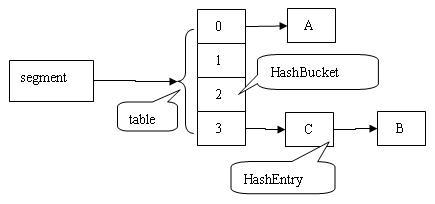
ConcurrentHashMap has such advanced concurrent capabilities because it uses a finer-grained locking mechanism. We don’t delve in to the details of the locking algorithm, but understand that the ConcurrentHashMap uses different locks to lock different parts of the map, which enables concurrent reads and updates.

The methods of all classes in java.util.concurrent and its subpackages extend these guarantees to higher-level synchronization. In particular:

  • Actions in a thread prior to placing an object into any concurrent collection happen-before actions subsequent to the access or removal of that element from the collection in another thread.
  • Actions in a thread prior to the submission of a Runnable to an Executor happen-before its execution begins. Similarly for Callables submitted to an ExecutorService.
  • Actions taken by the asynchronous computation represented by a Future happen-before actions subsequent to the retrieval of the result via Future.get() in another thread.
  • Actions prior to “releasing” synchronizer methods such as Lock.unlock, Semaphore.release, and CountDownLatch.countDown happen-before actions subsequent to a successful “acquiring” method such as Lock.lock, Semaphore.acquire, Condition.await, and CountDownLatch.await on the same synchronizer object in another thread.
  • For each pair of threads that successfully exchange objects via an Exchanger, actions prior to the exchange() in each thread happen-before those subsequent to the corresponding exchange() in another thread.
  • Actions prior to calling CyclicBarrier.await and Phaser.awaitAdvance (as well as its variants) happen-before actions performed by the barrier action, and actions performed by the barrier action happen-before actions subsequent to a successful return from the corresponding await in other threads.

Java ConcurrentHashMap Example:

The following example demonstrates how ConcurrentHashMap is used in a multi-threaded context. The program creates two writer threads and 5 reader threads working on a shared instance of a ConcurrentHashMap.

Example:

public class WriterThread extends Thread {
    private ConcurrentMap<Integer, String> map;
    private Random random;
    private String name;
 
    public WriterThread(ConcurrentMap<Integer, String> map,
                        String threadName, long randomSeed) {
        this.map = map;
        this.random = new Random(randomSeed);
        this.name = threadName;
    }
 
    public void run() {
        while (true) {
            Integer key = random.nextInt(10);
            String value = name;
 
            if(map.putIfAbsent(key, value) == null) {
                long time = System.currentTimeMillis();
                String output = String.format("%d: %s has put [%d => %s]",
                                                time, name, key, value);
                System.out.println(output);
            }
 
 
            Integer keyToRemove = random.nextInt(10);
 
            if (map.remove(keyToRemove, value)) {
                long time = System.currentTimeMillis();
                String output = String.format("%d: %s has removed [%d => %s]",
                                                time, name, keyToRemove, value);
                System.out.println(output);
            }
 
            try {
                Thread.sleep(500);
            } catch (InterruptedException ex) {
                ex.printStackTrace();
            }
        }
    }
}

To get in-depth knowledge, enroll for a live free demo on Learn Java Online

Treemap in java collections with examples

TreeMap is Red-Black tree based NavigableMap implementation. It is sorted according to the natural ordering of its keys.

The TreeMap in Java is used to implement Map interface and NavigableMap along with the Abstract Class.

The map is sorted according to the natural ordering of its keys, or by a Comparator provided at map creation time, depending on which constructor is used. This proves to be an efficient way of sorting and storing the key-value pairs.

The storing order maintained by the treemap must be consistent with equals just like any other sorted map, irrespective of the explicit comparators.

The treemap implementation is not synchronized in the sense that if a map is accessed by multiple threads, concurrently and at least one of the threads modifies the map structurally, it must be synchronized externally. For more Java Online Course

Some important features of the treemap are:

  • Java TreeMap contains values based on the key. It implements the NavigableMap interface and extends AbstractMap class.
  • Java TreeMap contains only unique elements.
  • Java TreeMap cannot have a null key but can have multiple null values.
  • Java TreeMap is non synchronized.
  • Java TreeMap maintains ascending order.
  • This class is a member of Java Collections Framework.
  • The class implements Map interfaces including NavigableMap, SortedMap and extends AbstractMap
  • TreeMap in Java does not allow null keys (like Map) and thus a NullPointerException is thrown. However, multiple null values can be associated with different keys.
  • All Map.Entry pairs returned by methods in this class and its views represent snapshots of mappings at the time they were produced. They do not support the Entry.setValue method. Learn more information from java Online Training

TreeMap Hierarchy:

The TreeMap class is declared as following in Java. It extends AbstractMap class and implements NavigableMap interface. Here 'K' is the type of keys and 'V' is the type of mapped values to keys.

public class TreeMap<K,V>
    extends AbstractMap<K,V>
    implements NavigableMap<K,V>, Cloneable, java.io.Serializable
{
    //implementation
}

TreeMap Constructors:

The TreeMap has five types of constructors:

  1. TreeMap(): creates a new, empty tree map, using the natural ordering of its keys.
  2. TreeMap(Comparator c): creates a new, empty tree map, ordered according to the given comparator.
  3. TreeMap(Map map): creates a new tree map containing the same mappings as the given map, ordered according to the natural ordering of its keys.
  4. TreeMap(SortedMap map): creates a new tree map containing the same mappings and using the same ordering as the specified sorted map. Learn from Java Certification Course

Custom Sorting in TreeMap:

If we’re not satisfied with the natural ordering of TreeMap, we can also define our own rule for ordering by means of a comparator during construction of a tree map. In the example below, we want the integer keys to be ordered in descending order:

public void givenTreeMap_whenOrdersEntriesByComparator_thenCorrect() {
    TreeMap<Integer, String> map = 
      new TreeMap<>(Comparator.reverseOrder());
    map.put(3, "val");
    map.put(2, "val");
    map.put(1, "val");
    map.put(5, "val");
    map.put(4, "val");
         
    assertEquals("[5, 4, 3, 2, 1]", map.keySet().toString());
}

When to use TreeMap in Java

Most of the time HashMap will be enough to use as Map implementation in your program. But if you have some special requirements related to sorting, finding next lower and higher key, work on a submap then you can go for TreeMap.

Example:

import java.util.TreeMap;
import java.util.Set;
import java.util.Iterator;
import java.util.Map;

public class Details {

   public static void main(String args[]) {

      /* This is how to declare TreeMap */
      TreeMap<Integer, String> tmap = 
             new TreeMap<Integer, String>();

      /*Adding elements to TreeMap*/
      tmap.put(1, "Data1");
      tmap.put(23, "Data2");
      tmap.put(70, "Data3");
      tmap.put(4, "Data4");
      tmap.put(2, "Data5");

      /* Display content using Iterator*/
      Set set = tmap.entrySet();
      Iterator iterator = set.iterator();
      while(iterator.hasNext()) {
         Map.Entry mentry = (Map.Entry)iterator.next();
         System.out.print("key is: "+ mentry.getKey() + " & Value is: ");
         System.out.println(mentry.getValue());
      }

   }
}

To get in-depth knowledge, enroll for a live free demo on Java online Classes

What Exactly Java Applet is and Its Architecture

What is Applet?
An applet is a Java program that can be embedded into a web page. It runs inside the web browser and works at client side. An applet is embedded in an HTML page using the APPLET or OBJECT tag and hosted on a web server. For more additional info Java Online Course

Applets are used to make the web site more dynamic and entertaining.

Let’s understand first how many Package does GUI support:

  1. AWT(Abstract Window Toolkit)
  2. Swing

Throwback of making GUI application:

Java was launched on 23-Jan-1996(JDK 1.0) and at that time it only supported CUI(Character User Interface) application. But in 1996 VB(Visual Basic) of Microsoft was preferred for GUI programming.

So the Java developers in hurry(i.e within 7 days) have given the support for GUI from Operating System(OS). Now, the components like button,etc. were platform-dependent(i.e in each platform there will be different size, shape button).

But they did the intersection of such components from all platforms and gave a small library which contains these intersections and it is available in AWT(Abstract Window Toolkit) technology but it doesn’t have advanced features like dialogue box, etc.

Important points :

  1. All applets are sub-classes (either directly or indirectly) of java.applet.Applet class.
  2. Applets are not stand-alone programs. Instead, they run within either a web browser or an applet viewer. JDK provides a standard applet viewer tool called applet viewer.
  3. In general, execution of an applet does not begin at main() method.
  4. Output of an applet window is not performed by System.out.println(). Rather it is handled with various AWT methods, such as drawString().

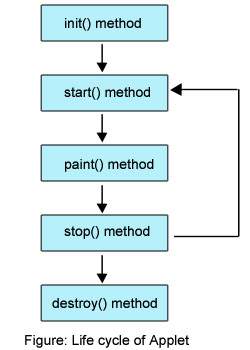
Life Cycle of an Applet

Four methods in the Applet class gives you the framework on which you build any serious applet −

  • init − This method is intended for whatever initialization is needed for your applet. It is called after the param tags inside the applet tag have been processed.
  • start − This method is automatically called after the browser calls the init method. It is also called whenever the user returns to the page containing the applet after having gone off to other pages.
  • stop − This method is automatically called when the user moves off the page on which the applet sits. It can, therefore, be called repeatedly in the same applet.
  • destroy − This method is only called when the browser shuts down normally. Because applets are meant to live on an HTML page, you should not normally leave resources behind after a user leaves the page that contains the applet.
  • paint − Invoked immediately after the start() method, and also any time the applet needs to repaint itself in the browser. The paint() method is actually inherited from the java.awt.

Example:

import java.awt.*;
import java.applet.*;
public class Simple extends Applet
{
 public void paint(Graphics g)
 {
  g.drawString("A simple Applet", 20, 20);
 }
}

To get in-depth knowledge, enroll for a live free demo on Java Online Training
Every Applet application must import two packages – java.awt and java.applet.

java.awt.* imports the Abstract Window Toolkit (AWT) classes. Applets interact with the user (either directly or indirectly) through the AWT.

The AWT contains support for a window-based, graphical user interface. java.applet.* imports the applet package, which contains the class Applet. Every applet that you create must be a subclass of Applet class.

The class in the program must be declared as public, because it will be accessed by code that is outside the program.Every Applet application must declare a paint() method. This method is defined by AWT class and must be overridden by the applet.

The paint() method is called each time when an applet needs to redisplay its output. Another important thing to notice about applet application is that, execution of an applet does not begin at main() method.

In fact an applet application does not have any main() method.

Difference between Applications and Applets

ApplicationsApplets
An application runs stand-alone.An applet program runs under the control of browser.
It can access any data or software available on the system.It cannot access anything on the system except browser’s service.
Execution start from the main() method.Execution start from the init() method because main() is not available.
It can read and write to the file system.Cannot read and write to the file systems.
Does not provide any security.An applet provides the security features.
Application run using Java interpreter.It runs using applet viewer or on web browser.

Java Architecture:

Java applets are essentially java window programs that can run within a web page.Applete programs are java classes that extend that java.applet.Applet class and are enabaled by reference with HTML page.

You can observed that when applet are combined with HTML, thet can make an interface more dynamic and powerful than with HTML alone. While some Applet do not more than scroll text or play movements, but by incorporating theses basic features in webpage you can make them dynamic.

These dynamic web page can be used in an enterprise application to view or manipulate data comming from some source on the server. The Applet and there class files are distribute through standard HTTP request and therefore can be sent across firewall with the web page data.

Applete code is referenced automatically each time the user revisit the hosting website. Therefore keeps full application up to date on each client desktop on which it is running.

Java hashcode() with example

Java hashCode():

Java Object hashCode() is a native method and returns the integer hash code value of the object. The general contract of hashCode() method is:

  • Multiple invocations of hashCode() should return the same integer value, unless the object property is modified that is being used in the equals() method.
  • An object hash code value can change in multiple executions of the same application.
  • If two objects are equal according to equals() method, then their hash code must be same. For more info Java Online Classes
  • If two objects are unequal according to equals() method, their hash code are not required to be different. Their hash code value may or may-not be equal.

Usage of hashCode() in Data Structures:

The simplest operations on collections can be inefficient in certain situations.

For example, this triggers a linear search which is highly ineffective for lists of huge sizes:

List<String> words = Arrays.asList("Welcome", "to", "Java");
if (words.contains("Java")) {
    System.out.println("Java is in the list");
}

Java provides a number of data structures for dealing with this issue specifically – for example, several Map interface implementations are hash tables.

When using a hash table, these collections calculate the hash value for a given key using the hashCode() method and use this value internally to store the data – so that access operations are much more efficient. For more additional info Java Online Training

Understanding How hashCode() Works

Simply put, hashCode() returns an integer value, generated by a hashing algorithm.

Objects that are equal (according to their equals()) must return the same hash code. It’s not required for different objects to return different hash codes.

The general contract of hashCode() states:

  • Whenever it is invoked on the same object more than once during an execution of a Java application, hashCode() must consistently return the same value, provided no information used in equals comparisons on the object is modified. This value needs not remain consistent from one execution of an application to another execution of the same application
  • If two objects are equal according to the equals(Object) method, then calling the hashCode() method on each of the two objects must produce the same value
  • It is not required that if two objects are unequal according to the equals(java.lang.Object) method, then calling the hashCode method on each of the two objects must produce distinct integer results. However, developers should be aware that producing distinct integer results for unequal objects improves the performance of hash tables

public int hashCode()

Returns a hash code value for the object. This method is supported for the benefit of hash tables such as those provided by HashMap.

The general contract of hashCode is:

  • Whenever it is invoked on the same object more than once during an execution of a Java application, the hashCode method must consistently return the same integer, provided no information used in equals comparisons on the object is modified. This integer need not remain consistent from one execution of an application to another execution of the same application.
  • If two objects are equal according to the equals(Object) method, then calling the hashCode method on each of the two objects must produce the same integer result.
  • It is not required that if two objects are unequal according to the equals(java.lang.Object) method, then calling the hashCode method on each of the two objects must produce distinct integer results. However, the programmer should be aware that producing distinct integer results for unequal objects may improve the performance of hash tables.

To get in-depth knowledge, enroll for a live free demo on Java Online Course

Introduce Yourself (Example Post)

This is an example post, originally published as part of Blogging University. Enroll in one of our ten programs, and start your blog right.

You’re going to publish a post today. Don’t worry about how your blog looks. Don’t worry if you haven’t given it a name yet, or you’re feeling overwhelmed. Just click the “New Post” button, and tell us why you’re here.

Why do this?

  • Because it gives new readers context. What are you about? Why should they read your blog?
  • Because it will help you focus you own ideas about your blog and what you’d like to do with it.

The post can be short or long, a personal intro to your life or a bloggy mission statement, a manifesto for the future or a simple outline of your the types of things you hope to publish.

To help you get started, here are a few questions:

  • Why are you blogging publicly, rather than keeping a personal journal?
  • What topics do you think you’ll write about?
  • Who would you love to connect with via your blog?
  • If you blog successfully throughout the next year, what would you hope to have accomplished?

You’re not locked into any of this; one of the wonderful things about blogs is how they constantly evolve as we learn, grow, and interact with one another — but it’s good to know where and why you started, and articulating your goals may just give you a few other post ideas.

Can’t think how to get started? Just write the first thing that pops into your head. Anne Lamott, author of a book on writing we love, says that you need to give yourself permission to write a “crappy first draft”. Anne makes a great point — just start writing, and worry about editing it later.

When you’re ready to publish, give your post three to five tags that describe your blog’s focus — writing, photography, fiction, parenting, food, cars, movies, sports, whatever. These tags will help others who care about your topics find you in the Reader. Make sure one of the tags is “zerotohero,” so other new bloggers can find you, too.

Design a site like this with WordPress.com
Get started