Event Management in Sevicenow

The ServiceNow® Event Management application helps you to identify health issues across the datacenter on a single management console. It provides alert aggregation and root cause analysis (RCA) for discovered services, application services, and automated alert groups. Event Management is available as a separate subscription from the rest of the Now Platform.

Understanding Event Management

Monitor the health of services and infrastructure using a single management console and respond appropriately to any issues that come up. Event Management provides intelligent event and alert analysis to ensure continuity of your services’ performance. Event Management receives and processes events via the MID Server.

What Event Management can manage

Event Management can manage:Discovered servicesA service is a definition of interrelated CIs from the CMDB. The discovered service, from Service Mapping, includes a service map with: mapping relationships, an impact tree showing outage severity, active alerts, related alerts, and CI properties. Service information is discovered by Service Mapping. The mapping information appears on dashboards, the Alerts list, and the Events list.Application servicesAn application service is a service created by selecting CIs to include in the service. Application service information appears on dashboards with drill-down capability to a map view.Technical servicesA Technical service is a dynamic grouping of CIs, based on some common criteria. For example, you can create a technical service based on location for all web servers or all databases in Ireland.Alert groupsAlert groups show sets of alerts for ease of maintenance.

Architecture

As events occur on various systems, the MID Server connector instance sends the events to the instance. Event Management generates alerts, applies alert management rules, and prioritizes alerts for remediation and root cause analysis. View this information on dashboards, the alert list in Alert Intelligence, or from a service map.

Event Management architecture

Workflow

Event Management receives external events and generates alerts based on event and alert management rules. Events are sent directly to your instance using an email server, script, SNMP trap, or a web service API. The corresponding alerts appear on dashboards for tracking and remediation purposes.

As the computer, software, or service generates events, the MID Server polls the external event tracking tool. The MID Server, which maintains a connection to Event Management, sends the information to your instance for storage, processing, and remediation.

The instance stores events in the Event [em_event] table and attempts to generate alerts based on pre-defined rules and event mappings. Regardless of whether an alert generates, the original event is available for review and remediation. Alerts generate according to the following process flow: More info at servicenow Online Training

  1. Find the best matching event rule for an event. If the source of the event matches the source specified in an existing rule, then a rule is matched. Also, if the event matches the optional rule Filter and the event additional_info value matches the rule Additional Information filter. A rule without any filter is ignored, for example the source filter is missing or the Additional Information filter is missing. If multiple rules are defined for the same type of event, use the rule Order to determine the order of rule application.
    • If the rule Ignore check box is selected, no alert generates. However, the event is still available for review and remediation.
    • If transforms have been defined, apply them. If compose parameters are set, apply the additional content to display to the user in the alert.
    • If Active in the threshold section is selected, accumulate all events until the threshold is met. Generate a single alert for the events.
  2. Search for an event field mapping even if there was no event rule. If an event field mapping is found, apply the mapping information. If the event has no severity after the event transformations, retain the event for reference purposes and do not generate an alert. Learn more from Servicenow Certification
  3. Search the Alert [em_alert] table for a matching message key. If a matching message key exists, update the alert according to the event information. If a matching message key does not exist, create an alert. If another event has the same matching key, associate the events under a single alert. For root cause analysis purposes, bind the alert to a specific CI.
Event Management event workflow
Event workflow

Event Management and Service Mapping

Event Management uses discovered services from Service Mapping and automated alert groups with root cause analysis (RCA) to expedite alert resolution.

When an event from an external source arrives from the MID Server, script, or web service API (not pictured), Event Management locates CI information for alert generation and CI remediation. CI information is stored in the CMDB from sources such as Service Mapping, Discovery, third-party sources, and manual population. You can use correlated alert group and root cause analysis information to resolve the issue.

Event Management interoperability

To get in-depth knowledge, enroll for a live free demo on Servicenow Training
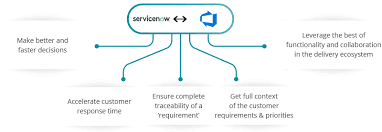
Microsoft Azure DevOps Integration for Agile Development

Enable bidirectional synchronization of records between Microsoft Azure DevOps with ServiceNow® Agile Development 2.0 by integrating the two applications.

For example, if you update a record in Azure DevOps, the update is reflected in Agile Development. Similarly, if you update a record in Agile Development, the update is reflected in Azure DevOps.

ServiceNow Azure DevOps Integration | Azure DevOps Integration Tool

Integration of Azure DevOps with Agile Development enables you to do the following:

  • View available Azure DevOps projects in Agile Development.
  • Perform a bulk import of records from Azure DevOps to Agile Development.
  • Perform single record updates between Azure DevOps and Agile Development.
  • Avoid duplicating record update entries in Azure DevOps and Agile Development.
  • Plan, track, and update your tasks from a single application.

Request apps on the Store

Visit the ServiceNow Store website to view all the available apps and for information about submitting requests to the store. For cumulative release note information for all released apps.Install Microsoft Azure DevOps Integration for Agile Development

Install the Microsoft Azure DevOps Integration for Agile Development

Connect Agile Development and Azure DevOps

Establish a connection between Agile Development and Azure DevOps using the sn_ado_int.user role. For more info Servicenow Training

Create an Azure DevOps connection alias

Create a Basic Auth credential and an HTTP(s) connection which will together be used as a connection alias to establish a connection with Azure DevOps.

Procedure

  1. Create a Connection & Credential alias
  2. Create Basic authentication credentials.
  3. Create Create an HTTP(s) connection Create an HTTP(s) connection.Note:
    • A connection alias (sn_ado_int.Azure_DevOps) is available by default.
    • You must create a connection alias for every Azure DevOps organisation that you use.

Create an Azure DevOps instance

Create an Azure DevOps instance record using the connection alias that you created. This instance is used to establish an integration between Agile Development and Azure DevOps.

Procedure

  1. Navigate to Agile Azure DevOps Integration > Azure DevOps Instances.
  2. Click New.
  3. On the form, fill in the fields.

Connect to Azure DevOps

Connect Azure DevOps with Agile Development to enable the integration.

Procedure

  1. Navigate to Agile Azure DevOps Integration > Azure DevOps Instances.
  2. Open your Azure DevOps instance record.
  3. Click Connect.If the State field on the Azure DevOps Instance record shows:
    • Connected, the connection is successful.
    • Not connected, the connection could not be established. You can view the reason for the failure in the error message.

Generate a default map configuration between Azure DevOps and Agile Development

Generate a default map configuration to map records from Azure DevOps to Agile Development.

Before you begin

About this task

When you import available epics, stories, and issues from Azure DevOps, this data is stored in tables as defined in the map configuration. You can customize map configuration for tables, fields, and states from Azure DevOps to Agile Development.

You cannot import an issue from Azure DevOps to Agile Development if the table map does not exist for this issue type.

Procedure

  1. Navigate to Agile Azure DevOps Integration > Azure DevOps Instances.
  2. Open your Azure DevOps instance record.
  3. Click Create Mappings.Note: If a mapping already exists, the Create Mappings button is not displayed.

Default map configuration

Understand the default field map configuration, for epics and stories, between Azure DevOps and Agile Development.

By looking at the default map configuration, you can see how work item types in Azure DevOps are mapped in Agile Development. You can also see how fields are mapped between the two applications.

You can view the default map configuration tables as follows.

  1. Navigate to Agile Azure DevOps Integration > Azure DevOps Instances.
  2. Open your Azure DevOps instance record.
  3. From the Table maps related list, open the record for a user story or epic.

The following table lists the default field map configuration for a story and epic.

To get in-depth knowledge, enroll for a live free demo on Servicenow Online Training

Common Workday Integration Challenges (and How to Tackle Them)

Integration projects have a bad reputation in the tech world. They can be costly, time-consuming, and frequently result in an outcome other than the one you set out to achieve. In fact, some studies show that 70 percent of all system integration projects fail. But you don’t have to be a statistic! 

Workday Integration Course | Workday Training | OnlineITGuru

In this article, we cover the challenges to consider (and let you in on the solutions) before you get started with your Workday integration project. Let’s dive in.

What is Workday HCM?

The Workday Human Capital Management (HCM) Suite is a cloud-based solution that includes many applications that integrate recruiting, talent management, benefits, payroll, financial, etc. into a single platform. In many cases, businesses using Workday need to be able to integrate data from a third-party vendor or an enterprise resource planning (ERP) system. And since doing so can be tricky, you’ll need to set a strategy for how to integrate Workday with your existing (and potentially future) solutions, before you even start implementing Workday as a solution. learn Workday Online Training

Common Integration Challenges

Integrating Workday into your current IT environment can require a major investment in time, resources, and money. Here are some of the major issues you might run into when integrating Workday with other solutions: 

  • Increasing IT costs
  • Working with many different (and disparate) systems and technologies
  • Continuous maintenance and support cycles for integration

One trend we’ve seen in the integration space is businesses using point-to-point solutions to connect and synchronize data between Workday and other systems, services, data sources, and APIs. This establishes a direct connection between endpoints, and everything seems perfect, right?

Well, point-to-point connections are perfect until you need to make changes…which require an experienced developer…which can slow down the process and leave connections vulnerable to breakage. (Not to mention the complexity of the integrations and numerous endpoints that need to be connected.) Lack of reliability and scalability make point-to-point integrations a less-than-ideal solution for this sort of project

Integration Considerations to Keep in Mind

Besides evaluating whether point-to-point solutions will work for your Workday setup, there are a few others factors you’ll want to consider when you’re working on your integration strategy. Here are just a few of the important questions you’ll need to ask yourself, including… Get more skills from Workday Integration Training

Will I Have Real-time Connectivity?

For your Workday integration to succeed, you must have real-time connectivity. Not only is it useful in a wide variety of scenarios, but for some situations (HR needs to terminate an employee, for example) trying to do without real-time connectivity is just asking for trouble.

Is There On-premise Connectivity?

In today’s hybrid IT environment, your integration platform must allow for native support for both cloud-based and on-premise systems. A solution that looks great at first blush but doesn’t take into account where your systems live is not the solution for you.

Are There Scalability Limitations?

As any growing business knows, scalability is everything. Make sure that your integration platform can handle a high volume of data flow and that there are no limits on the number of concurrent integration processes. Otherwise, a system that works well when times are slow may fail when things pick up speed.

Do I Have Enterprise Extensibility? 

An integration platform with limits on the number of applications and integration scenarios it can handle is bound to cause problems down the road. Better to stick to a solution that has your back, no matter how sticky things get.

Challenge + Expert = Solution

Workday offers a few solutions when it comes to integrations, including using standards-based interfaces when possible, demanding more out-of-the-box integration solutions from its partners, and providing users with a clear strategy to help them leverage cloud infrastructure (which allows them to lighten the load on their IT staff).

Workday’s approach is helpful, but as you know, getting any big project done correctly and quickly—all while maintaining your other duties—can be a multitasking nightmare. The best way to prepare for one? Partner with experts who can make sure you get it done right the first time.

To get in-depth knowledge, enroll for a live free demo on Workday HCM Online Training

Power BI vs Tableau vs QlikView: Which BI Software is the Winner

Analytics is the primary enabler to derive truth and meaning from data that drives the business growth” – Hugo Moreno via Forbes.

Companies rely on data more than ever before, as almost all information is completely digitized. Business intelligence software makes sense of the modern data landscape. The best BI systems offer features that analyze and report data for streamlined presentation.

Data Visualization
Tableau leads the industry in data visualization software. The company is investing heavily in advanced data federated, clustering, segmentation and more powerful analytics functions. The user-friendly interface allows non-technical users to quickly and easily create customized dashboards to provide insight into a broad spectrum of business information. The drag-and-drop capabilities of the solution, paired with its extensive data source connections, make Tableau a front-runner in the realm of data visualizations.

Along with standard report creation features — visualization templates, customizable views, configurable graphics — Qlikview data visualizations factor in real-time, interactive analysis as reports are made. When the system is in use, all relevant visualizations and data sets are displayed for quick reference. Qlik’s product strengths include an in-memory engine capable of visualizing patterns and producing associative analytics that isn’t achievable using SQL alone. The in-memory engine is scalable enough to integrate with many different types of data sources, creating a unified dashboard showing analytics, metrics and key performance indicators (KPIs) of interest. Learn more from Tableau Training

Microsoft Power BI hosts one of the most user-friendly data visualization tools in the business intelligence market. The drag-and-drop functionality of the software, along with access to over 85 data visualization applications, provides an uncomplicated experience that results in visually appealing and informative reports. Microsoft Power BI utilizes many of the same functions available in Excel, so users with experience in the Office staple will be able to adapt to this visualization tool. Creating reports through Microsoft Power BI results in data portraits that can be shared across teams and accessed on any device.
Replace
Delete
Analytics
Tableau is committed to providing a tool to enterprises that reflects their urgent analytics requirements. This is evident in the enhancements to data federation, streamlined interfaces, advanced analytics and improvements to mobile exploration and authoring. Tableau reflects the needs of organizations that want to move beyond the data visualization aspects of their applications and get more advanced analytics work done. Support for more complex data federation workflows, making data mashups more reusable and making improvements to mobile app development to support all mobile screen sizes is available in the software.

Unlimited data sources can be combined in QlikView without the need for initial preparation. Qlik relies on sophisticated analytics that enables data discovery using an in-memory engine to analyze data for patterns not visible via SQL data structures or queries. The system’s Social Media Analytics function analyzes data from social channels including Twitter, Foursquare and Disqus, and QlikMaps provides location analytics.

QlikView promises “speed of thought” automatic analysis and insights as users interact with their data. The software’s guided analytics features provide a path through data and point users in the direction of insights, helping employees of all skill levels perform analytics.

Data prep, data discovery and interactive dashboards are all included in the Power BI Suite and Power BI Desktop. Measurement, organizational and predictive features allow for simple data management and trend interpretation. Besides the tools for standard data analysis, Power BI hosts integration with location-based data programs such as SQL Server Geospatial, BING and Esri ArcGIS.Get more skills from Tableau Online Course

In the comparison of QlikView vs. Tableau and Microsoft Power BI, QlikVIew has the best analytic features. The software boasts a flexible analytics platform that allows businesses to customize guided analytics applications that update during use.

Document Management
Tableau has included support for publishing analytics content on a variety of publishing platforms. Options available for report formatting include PDFs, spreadsheets, images and crosstabs. Users can view all stages of a report’s creation with a feature that archives all past versions to be viewed later.

QlikView users can convert reports into XLS, HTML, XML, QVX and PDF formats — with the help of a PDF Report Distribution add-on. The software supports QlikView script files (qvw) to allow for simplified tracking and comparison of binary files. QlikView’s version control tool can track fluctuations in data.

Reports generated in Microsoft Power BI can be exported as PDF, TIFF, HTML and Microsoft Office files. Power BI files include desktop files (pbix) and templates (pbit). With Microsoft as the engine behind Power BI, report exporting and document access is simple. However, Power BI does not directly support version control.

These three business intelligence solutions are equivalent in the category of document management. All of the programs are able to convert reports into multiple formats with ease.

Decision Services
Tableau’s consulting services provide a resource for assistance in data analysis interpretation and decision making. Fraud detection tools embedded in the software serve as a robust security measure. Included as part of this focus on broader analytics support are improvements to self-service data preparation, more control over data governance and metadata management, and additions to embedded advanced analytics.

QlikView’s financial services and banking tools provide accurate knowledge and analysis that leads to informed decision making, while security measures minimize fraud risk. Necessary regulations and policies are monitored with QlikView Governance Dashboard compliance tools. QlikView Logs provide data on CPU, RAM, Disk, Process, User, Document and Reload information. The vast range of QlikView’s BI tools can be learned quickly using their online tutorials and learning systems. The product comes bundled with numerous tutorials, how-to guides and other self-help resources, as well as a team of QlikView experts. Qlik’s consultants can assist with each step of learning the system’s capabilities, from beginner lessons to pulling data insights and creating applications.

Microsoft Power BI can be used as a financial analysis tool with fraud protection, compliance monitoring and additional security features. Regulatory compliance is managed through a data residency model that focuses on compliance requirements, including those of the Free Trade Association and European Union. Analysis functions display trends and offer insights through consulting services. Power BI consultants give users a support system for all inquiries concerning the software’s functions. Not only serving as a guide to the software’s functions, consulting services through Microsoft Power BI offer insight into the analyses provided by the system. Additional services include financial analytics, fraud prevention and security measures, and compliance monitoring. Microsoft has also collaborated with companies like Dell, Avanade Inc. and Bismart for the Power BI partner program — a team of over 300 organizations bringing solutions and expertise to users. And with the Power BI partner search engine, businesses can use filters to find the right solution for their location, industry and company size.

When considering Power BI vs Tableau or Power BI vs QlikView, the partner companies of Microsoft Power BI place the program’s decision services above the others. Power BI partners provide an extensive source of know-how unmatched by competitors.

Integrations
Tableau includes improved support for REST APIs and JavaScript, making integration across analytics platforms more efficient and less reliant on customized programming. Tableau’s integration support, through the use of APIs, allows for streamlined collaboration with programs such as Google Analytics, SAP, Salesforce, Microsoft Office, and social media channels. Security system integrations with programs such as Active Directory, Kerberos and OAuth add an extra level of protection to the software’s built-in security measures.

Qlik has one of the most advanced Application Programming Interface (API) command sets in the analytics industry and has continually been improving its functionality over the last several years. QlikView’s API provides seamless integration with other tools and the data housed within them. With many enterprises requesting API support, Qlik has also provided APIs to control functions previously accessible only through the user interface. The result has been rapid adoption of the Qlik Analytics Platform (QAP), which is being used today by developers to embed analytics queries into reporting and analytics apps. QlikView has the ability to extract data from standard open database connectivity (ODBC) and OLE connections and non-standard, unstructured sources like text files and XML files. Integration with web services, security tools, legacy systems and metadata is offered through QlikView as well. The software advertises coordination with Excel, Salesforce, SAP Netweaver and Microsoft SharePoint.

Microsoft Power BI possesses the advantage of Microsoft’s familiarity and connections to assorted applications. Users of Microsoft Power BI can mine data from programs such as Microsoft Excel, Google Analytics, MySQL, Oracle, Salesforce, MailChimp, Facebook and Zendesk, with new data sources added every month. The Microsoft foundation of this analytic tool ensures a smooth meshing of Power BI with the existing work base of a business. One of the more innovative features of Microsoft Power BI is the ability to use browser- and desktop-based authoring with apps and platforms that are both on-premise and in the cloud. This hybrid integration strategy is based on the Microsoft Azure Cloud APIs.

To get in-depth knowledge, enroll for a live free demo on Tableau Training


The Microsoft backing of the Power BI platform ensures simple integration with a number of external applications. Nearly every program that works with Microsoft can integrate with Power BI, offering an expansive library of possible collaboration options.

Introduction to Workday Integration

Introduction to Workday Integration

Integrations are crucial when communicating external systems with Workday. To be able to say you master them means that you understand how data can be imported to or exported from Workday. Thankfully, there are predefined rules of how that data must look like, and public interfaces you can access anytime you need to build an integration.

Workday provides single-architecture, cloud-based enterprise application and management suites that combine finance,HR,and analytics into a single system.Workday Integration is designed to balance high-security standards,agile updates,powerful insights,and intuitive UI across devices. For more info Workday training

What are the main types of Workday Integrations and how do you select which solution to use?

  • The main types of integrations are Workday Studio Integration, Enterprise Information Builder (EIB) Integration and Cloud Connect Integration.
  • When deciding over which tool to use we need to take into account some factors; whenever you take in the design of an integration, from the requirements you should follow a roadmap, here is an example of it:
  1. Is the solution already pre-built? Am I connecting to a third-party vendor with a solution already in place? – If yes, most likely you will choose a Core Connector.
  2. Does this integration just need to export or import some data into Workday? – If yes, then most likely you need to go with EIBs.
  3. Do I need to execute several rules, and reports to get the data and calculate the results I need? For example: Determining payroll between Exempt and Non-Exempt employees, calculate deductions, etc. – If yes, then most likely you need a Workday Studio Integration.

This technical document examines Workday’s Core Connectors and Documentation Transformation technology which provide pre-built templates that allow developers to implement integration systems. Core Connectors address the majority of the effort to integrate with third-party endpoints. They can be implemented as delivered or can provide the foundation upon to which to extend this functionality leveraging Workday’s Integration Cloud Platform. Core Connector usage provides a rapid, flexible and re-usable method for integrating with Workday, ensuring that external systems receive only the data that you want to expose. Document Transformation templates incorporate XSLT code providing the developer the capability to transform both data structure and content of the XML document to meet client requirements. As part of Document Transformation this class will cover Workday specific processing instructions known as Element Transformation and Validation (ETV) and XML TText (XTT).

Workday Connectors are currently available for:

  • Benefits 
  • HCM 
  • Workday Payroll 
  • Third-Party Payroll 
  • Financials 
  • Spend Management 
Workday Connectors
Steps to building a connector integration

Integration systems are tenanted definitions of a Workday integration. An integration system has the following building blocks:

  • Integration Template Establishes the framework for data exchange through a collection of integration services.
  • Integration Service Contains a set of attributes and maps related to a specific integration function. Integration services use XSLT (eXtensible Stylesheet Language Transformations) to convert Workday XML into a format that an external system can read.
  • Integration Attribute Provides one or more tenanted values for a data element in Workday.
  • Integration Map Defines relationships between Workday values and external system values. Examples are maps for benefit coverage levels, marital status, gender, job classifications, and locations.
  • Transaction Log Provides a record of business processes and events in Workday. Integrations can subscribe to specific transaction log events to capture the changes to employee data that are relevant to an external system.

Workday Integration Cloud

Workday’s Integration Cloud Platform is a complete Integration Platform as-a–Service (iPaaS) for building, deploying, and managing integrations to and from Workday. It provides a proven, enterprise-class platform that consists of an Enterprise Service Bus (ESB) embedded as part of the Workday platform with associated tools directly within the Workday UI for managing and monitoring integrations. The Workday Integration Cloud also provides pre-built and delivered connections to non-Workday systems, as well as tools for developing custom integrations. All integrations are deployed to and run on Workday without the need for any on-premise middleware.

Workday integration cloud

Advantages of using Workday for Integration

Clearly, you can build any integration you need to the Workday API using your own middleware technology; MuleSoft, Boomi, TIBCO, or Oracle Fusion Middleware are just a few of the middleware tools used by Workday customers. However, there are several major advantages to using the Workday Integration Cloud:

-Integrations surface naturally inside the Workday user interface. You can view the integrations, launch them, schedule them, secure them, include them in Workday business processes, configure notifications around them, and audit and log them— all from within the Workday user experience. For more info Workday Online Course

-Both packaged and custom integrations run on Workday software and hardware infrastructure in our data centers. You do not need to license or use any on-premise integration middleware platform, which can greatly simplify the deployment and management of integrations especially when the majority of the integrations are connecting to Workday

-Finally Workday’s integration tools are also highly optimized for efficiently building integrations to and from Workday. Purpose-built packaged components handle much of the plumbing aspects of integration-building, freeing you to focus on the critical business logic.

Overall, Workday’s packaged integrations and tools are widely proven in a variety of demanding situations and offer a lower-cost, lower-risk path to delivering needed integrations in support of your deployment.

To get in-depth knowledge, enroll for a live free demo on Workday Online Training

How Workday Bridges the Gap between Amazon and OpenStack

“We embrace this concept of ‘The Power of One,’” the CEO said, “where every customer is on exactly the same version, one line of code, one security model, one user model, one user interface.” He explicitly called out his competitors, SAP and Oracle, calling them “Frankensource” organizations that conglomerate their multifarious open and proprietary technologies into an amalgam, whose contiguousness and continuity they spend far too much of their time maintaining.

Bhusri’s message preceded the announcement that all of Workday’s applications would run on Amazon AWS, as part of a multi-year partnership, after Workday engineers had completed an extensive technical assessment of all the alternative configurations.

“Amazon Web Services is a scary beast,” wrote Aporeto founder Amir Sharif for The New Stack, just days after re:Invent closed that year. “It is a fast-moving, hungry hippo that devours everything in its sight. And it is Hotel California: You can check out anytime you like, but you will never leave.” Get more from Workday training

Voices Down the Corridor

“We do have a little bit of a secret,” admitted Edgar Magana, senior principal software development engineer at Workday. Magana’s key accomplishment there has been the OpenStack-based platform which hosts his company’s virtual infrastructure.

You read this right. The applications running on Workday’s 650-plus servers in co-location facilities in Portland, Oregon; Lithia Springs, Georgia; Ashburn, Virginia; Amsterdam, the Netherlands; and Dublin, Ireland, have been and will continue to be serviced on a very sophisticated infrastructure layer based on the open source OpenStack infrastructure management software.

Since his involvement with OpenStack began in mid-2012, Magana told us, he had been personally involved with the open source effort to endow OpenStack with full support for AWS’ Elastic Compute Cloud (EC2) API. At one time, 100 percent compatibility had been a goal. But the community came to a collective realization, he said, that “we were always chasing Amazon’s tail, and we were not able to create our own thing.”

“With regard to the public cloud — to Amazon, in this case, it’s an extension,” Magana told The New Stack. “I always like to clarify that we have a very good agreement with Amazon to extend our services to the public cloud. We want to gain more flexibility. We want to have presence in places where building a data center is going to be a big challenge. Why don’t we just use the public cloud?  That’s the perfect scenario for those kinds of things.” Learn more skills from Workday Online Course

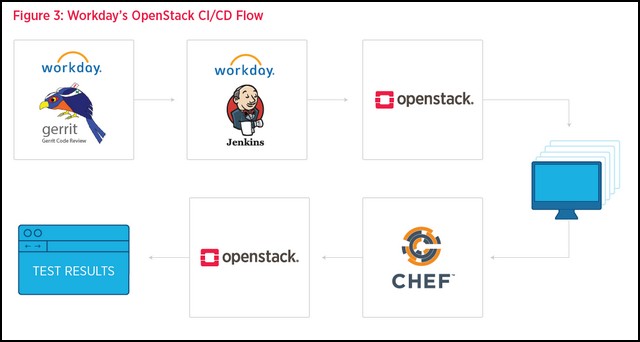
In a white paper for the OpenStack Foundation, co-authored with Intel and electronic health records provider AthenaHealth, Magana introduced the architecture with which his enterprise is hosting existing applications on virtual infrastructure, while simultaneously migrating new ones. It’s a system that utilizes Gerrit for code review, Jenkins for managing the deployment process, Chef for configuring workload instances on virtual machines, and OpenContrail for deploying and managing a hosted virtual network.

Getting the virtual machines on which Workday’s applications are hosted, moved to OpenStack, has already consumed a stretch of time. According to the white paper, the move has been “a staged process, involving a fair amount of operational complexity, tools, training, and ensuring endpoint connections. OpenStack helps to streamline their progress by automating the onboarding and validation process. Workday aims to have 40 percent of their applications under OpenStack by the end of 2017.”

The words “Amazon” and “AWS” do not appear anyplace in Magana’s white paper. That fact alone is extraordinary, for a company that last year was being touted as having effectively been won by Amazon (and which last February actually won Amazon as its own customer). Learn more skills from Workday Integration Training

The Mission Bell

Today, Magana co-chair’s OpenStack’s User Committee, and previously served on OpenStack’s board of directors.  So he may be Workday’s most fervent OpenStack advocate inside his company. He gives AWS its due credit, but he stops well short of the kind of brotherly embrace that Workday executives displayed last year.

“At the end of the day, what is Amazon, right?” said Magana. “It is a public cloud with a very strong API that gives you the ability to build whatever you want to build on the top of that. So what we have done on the OpenStack side [is], we built something on top of OpenStack to enable an application to smoothly transition from a development environment to the production system.”

Magana described for us an environment where hundreds of Workday developers build their applications using the methodologies we would normally associate with “cloud-native,” just without the public cloud part. They start on an OpenStack cloud, in Workday’s own data centers. An intermediate support layer, connected with Workday’s CI/CD pipelines, makes it possible for code developed internally on systems that don’t resemble Amazon’s in the least, to be smoothly migrated into a production environment that may — or may not — involve AWS territory. Get more from Workday Training Online

“That’s our little secret. We build some kind of middleware,” he said, “for our services to actually call that API, and deploy their services and code in virtual machines in OpenStack. And they don’t even know about it — they never talk to an OpenStack API, ever. They only know they have this API to say, ‘Here is my TAR file with my source code, or my RPM, or whatever kind of artifact.’ And we have a CI/CD system that actually grabs that artifact, wraps it up in a virtual machine, puts all the things we need around it — logging, monitoring, testing, security, and probably the most important thing, the signature certificates to publish that image into our data centers.

“[It] gets replicated across all the data centers, so we have exactly the same version everywhere,” the Workday engineer continued. “And whenever we’re ready to actually deploy it, we just say, ‘Hey, system, create me a thousand instances of this service.’ You’ve got it. People don’t know it’s OpenStack.”

Prisoners of Our Own Device

Could Workday’s middleware layer be useful beyond the company itself? Could it become a necessary and valuable open source component for any OpenStack deployment that involves a CI/CD pipeline, and compatibility with EC2?

“It wouldn’t make a lot of sense to do that,” responded Workday’s Edgar Magana. “We’re not doing anything that is magic. What we’re doing is, having a base image, putting our code there, and shipping it everywhere. That’s it.

“What we’ve done to make it so easy and automated,” he continued, “requires a lot of things that are very specific to the Workday environment. So it wouldn’t make sense for other people. But sharing the idea out there, we already do that, right? The white paper mentioned it, and other communications we have done have already mentioned it. Whenever we can share tools, we try to do it. But in general, just exposing this internal middleware code wouldn’t be useful for anyone at all, in my opinion.”

Every enterprise, he explained, will have its own technological challenges and use cases, so whatever middleware its engineers create must take those unique elements into account. The complexity involved with tackling this challenge will take its own, perhaps freakishly unique, shape along the way.

“What I will strongly recommend is to build something,” Magana advised. “I keep calling it ‘middleware,’ but something that abstracts the back-end platform, your pipeline system, from the way to deliver your application artifact to production. I strongly recommend that.”

It is nothing like Aporeto’s CEO described it: succumbing to the relentless will of a monopolistic beast with its sights set on world domination. If anything, Workday’s strategy is a do-it-yourself program for making global public cloud deployment viable for an organization that is not, and may not ever be, rooted there to begin with.

To get in-depth knowledge, enroll for a live free demo on Workday Online Training

Top Tableau Tools You Might Not Know About

Tools of Tableau

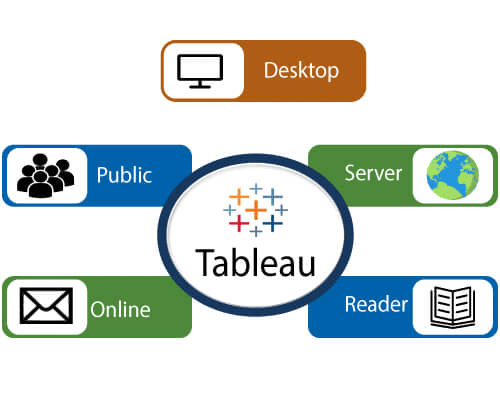
A list of Tableau tools:

  • Tableau Desktop
  • Tableau Public
  • Tableau Online
  • Tableau Server
  • Tableau Reader
Tableau Tools

Data analytics in Tableau is classified into two parts:-

  1. Developer Tools:- The Tableau tools which are used for development such as the creation of charts, dashboards, report generation and visualization are known as developer’s tools. Tableau Desktop and the Tableau Public, are the example of this type.
  2. Sharing Tools:- The role of these tools are sharing the reports, visualizations, and dashboards that were created using the developer tools. The Tableau tools that fall into this category are Tableau Server, Tableau Online, and Tableau Reader. For more info Tableau Training

Tableau Desktop

Tableau Desktop has a rich feature set and allows us to code and customize reports. Right from creating the reports, charts to blending them all to form a dashboard, all the necessary work is created in Tableau Desktop.

For live data analysis, Tableau Desktop establish connectivity between the Data Warehouse and other various types of files. The dashboards and the workbooks created here can be either shared locally or publicly.

Based on the connectivity to the publishing option and data sources, Tableau Desktop is also classified into two parts-

  • Tableau Desktop Personal:- The personal version of the Tableau desktop keeps the workbook private, and the access is limited. The workbooks can’t be published online. So, it should be distributed either offline or in Tableau public.
  • Tableau Desktop Professional:- It is similar to Tableau desktop. The main difference is that the workbooks created in the Tableau desktop can be published online or in Tableau server. In the professional version, there is full access to all sorts datatypes. It is best for those who want to publish their workbook in Tableau server. Learn more on Server with Tableau Server Training

Tableau Public

This Tableau version is specially built for cost-effective users. The word ‘Public‘ means that the created workbooks cannot be saved locally. They should be kept on the Tableau’s public cloud, which can be accessed and viewed by anyone.

There is no privacy of the files saved on the cloud, so anyone can access and download the same data. This version is the best for them who want to share their data with the general public and for the individuals who want to learn Tableau.

Tableau Online

Its functionality is similar to the tableau server, but data is stored on the servers that hosted on the cloud, which is maintained by the Tableau group.

There is no storage limit on the data which is published in the Tableau Online. Tableau Online creates a direct link over 40 data sources who are hosted in the cloud such as the Hive, MySQL, Spark SQL, Amazon Aurora, and many more.

To be published, both Tableau Server and Tableau online require the workbooks that are created by Tableau Desktop. Data that flow from the web applications say Tableau Server and Tableau Online also support Google Analytics and Salesforce.com.

Tableau Server

The software is correctly used to share the workbooks, visualizations, which is created in the Tableau Desktop application over the organization. To share dashboards in the Tableau Server, you should first publish your workbook in the Tableau Desktop. Once the workbook has been uploaded to the server, it will be accessible only to the authorized users.

It’s not necessary that the authorized users have the Tableau Server installed on their machine. They only require the login credentials by which they can check reports by the web browser. The security is very high in Tableau server, and it is beneficial for quick and effective sharing of data.

The admin of the organization has full control over the server. The organization maintains the hardware and the software. Get more skills Tableau Server Online Training

Tableau Reader

Tableau Reader is a free tool which allows us to view the visualizations and workbooks, which is created using Tableau Desktop or Tableau Public. The data can be filtered, but modifications and editing are restricted. There is no security in Tableau Reader as anyone can view workbook using Tableau Reader.

For more in-depth knowledge, enroll for a live free demo on Tableau Online Training

Tableau Desktop vs Tableau Public Difference

The Tableau Desktop is data visualization software that lets you see and understand data in minutes. The professional version of this can transform, process and store huge volumes of data which is responsible for all the data-driven decision making of an organization.

Cost - Tableau Desktop vs Tableau Public vs Tableau Reader - Edureka

The Tableau Public is essentially a free version of Tableau visualization software. It allows you to use most of the software functions. You can create visualizations and connect to CSV, Text and Excel documents. However, the largest difference is that Tableau Public does not allow you to save your workbooks locally.

The Tableau Reader allows you to read the Tableau file types. If you want to share your workbook by sending a file, the receiver will need a Tableau reader to open the document. So why do we need the reader? Without the reader, you may need to share it publicly or convert the workbook into a PDF format. Fro more Tableau Training

Tableau Desktop vs Tableau Public vs Tableau Reader

Can you create a visualization?

Creating Visualizations – Tableau Desktop vs Tableau Public vs Tableau Reader

Tableau Desktop essentially uses an AJAX-based JavaScript application to create a viz. It lets you ditch the slides for live stories on data that you can create, and others can explore.

Exceptional analytics demand more than a pretty dashboard. And you can quickly build powerful calculations from existing data, drag and drop reference lines and forecasts, and review statistical summaries.

Despite being an unpaid version, Tableau Public does just the same.

But the Tableau Reader is like a read-only app. It doesn’t support features to create/edit stories or graphs. Learn more skills from Tableau Server Training

What sources can you Connect to?

Data Sources – Tableau Desktop vs Tableau Public vs Tableau Reader

Tableau Desktop can connect to data on-prem or in the cloud—whether it’s big data, a SQL database, a spreadsheet, or cloud apps like Google Analytics and Salesforce. Access and combine disparate data without writing code. Power users can pivot, split, and manage metadata to optimize data sources.

Tableau Desktop Public Edition works with data from Microsoft Excel, multiple text file formats, statistical files, Google sheets, and web data connectors.

Tableau Reader does not need to connect to any source, but it can read reports built on top of any and all of the listed data sources that Tableau Supports.

How Secure is your Data?

Security – Tableau Desktop vs Tableau Public vs Tableau Reader

Your data is out in the public once your report is published on to the Tableau Public Server. For the other two options, you need an access link to access the Reports.

BI and Visualization Training

If you’d like to keep your data safe and private, you can opt for the Tableau Server.

  • It keeps data secure on your private servers.
  • Works with Tableau Mobile to take data everywhere.
  • Allows for guest user access. Get more skills from Tableau Server Online Training

How much data can you store?

Limit – Tableau Desktop vs Tableau Public vs Tableau Reader

Tableau Desktop has no limit to how many rows of data it can store, process or share whereas the limit for the Desktop Public App has been updated to 1 Million Rows recently.

How much does it cost? 

Cost – Tableau Desktop vs Tableau Public vs Tableau Reader

While Tableau Public and Reader apps are absolutely free of cost, Tableau Desktop has incurred the following prices;

  • Tableau Desktop Personal = $35 ( with annual maintenance $999)
  • Tableau Desktop Professional = $70 ( with annual maintenance $1,999)

Where is your Data Stored?

For Tableau Desktop, reports published can be stored on your Local Drive as well as on the Tableau Server whereas, for Tableau Public, reports published can only be saved on the Tableau Server.

To get in-depth knowledge enroll for a live free demo on Tableau Online Training

New Workday Connector Now Available in Open Connectors

In this blog, I’m announcing the release of the new Workday Connector in SAP’s Open Connectors and I’ll provide a quick overview of its features.

I’m excited to announce that phase 1 of the Workday Connector is now available in the SAP Open Connectors Catalog, part of the ERP hub!

“Is Workday really that difficult to integrate to?”

The answer is yes, but like with every API, “difficult” is relative.

Let me explain.

First, if you have ever had to integrate using the SOAP protocol, then you already know that it can be cumbersome to use when compared to using lighter frameworks like REST. Workday’s API is SOAP. Thus, as is the case will all of the connectors in the Open Connectors ecosystem, the Workday Connector converts and normalizes Workday’s native SOAP API to the Open Connectors uniform REST standards.

When using the Workday Connector, you won’t need to learn all the intricacies of Workday’s SOAP API, as it is 100% REST via the Connector: Workday Training

Second, Workday’s native SOAP API specification does not support bulk data. The new Workday Connector supplements for Workday’s missing bulk API support by providing built-in, ready to use bulk resources.

Third, the Workday API specification is massive, with over 2000+ resources.

For this first release of the Workday Connector, the most requested procure-to-pay workflow was selected and resources were added to support that. The needed resources for Order-to-cash and hire-to-retire will coming soon in a later release.

However, if you don’t care to wait for additional resources to be added, every Connector in the Open Connectors ecosystem is editable and extendable.

If you are familiar with Workday’s SOAP API, you can use Connector Builder to add in what you need. For example, you can easily modify the GET /supplier-classifications resource using Open Connectors built in tooling to modify existing or add new resources:

You can also solve this (which frankly I think is MUCH easier) by using the Workday Connector’s discovery resources:

FYI: All Connectors in the catalog are all standardized to a common set of features, including the ability to programmatically (or manually via UI) query the endpoint and determine what objects and associated object metadata are supported by the endpoint’s API. Learn more from Workday HCM Online training

Discovery resources are found via clicking on “API Docs” for the Workday Connector in the main Connectors catalog:

By having built-in discovery API resources built-in to the Connector, you now have access to every one of Workday’s 2000+ native resources. You can use the discovery API resources to determine what is available, and then build your own on the fly using the Connector’s “create your own” resources capability.

Just use the GET /objects resource, grab the object that you need, and substitute for objectName in the following:

This is no small feat, given that Workday does not provide out of the box functionality via their SOAP API to query for this information. The Workday Connector actually automatically scrapes Workday’s API documentation website to dynamically support the Connector’s discovery resources!

To summarize, the Workday connector is now available in Open Connectors. Having access to all of Workday’s APIs provides flexibility and quicker time to value for your customers. Also, given that the Workday Connector is REST, it is much easier and consistent to use versus writing directly to Workday’s SOAP API.

I hope you are as excited about the Workday Connector as I am!

A note regarding getting access to Workday’s service. They do not currently offer a sandbox that you can use to test as they tightly control who has access. Thus, if you use the Workday Connector, you will need to contact Workday or work with your Workday customer for integration options.

To get in-depth knowledge, enroll for a live free demo on Workday Online Training

Workday vs. Oracle Cloud HCM: Comparing Two Human Resources Software Giants

Workday vs. Oracle Cloud HCM: Comparing Two Human Resources Software Giants

Workday vs. Oracle for human capital management (HCM) is always going to be a difficult comparison. It wasn’t long ago that Oracle took over PeopleSoft to gain a better position in the HR space, forcing the PeopleSoft CEO to leave and start another people-focused ERP company built on cloud technology. Workday is that company.

Workday vs. Oracle HCM Cloud are just two of many full-service business software choices that include a comprehensive human capital management tool. Get recommendations for the best HCM for your medium or enterprise company via our Product Selection Tool. It only takes five minutes, and we’ll give you a shortlist of the top HR software options for you. Click the image below to get started.Which HR software
is right for your business?

Oracle is consistently ranked as one of the largest and most profitable companies in the world, but profitability doesn’t always equal innovation. Oracle’s long-standing love affair with on-premise technology made it difficult for the company to pivot to the cloud. Workday was built for the cloud. From its beginning it could push faster updates, it contained better data analytics tools, and it had a more user-friendly user interface. Oracle’s on-premise systems needed extensive modernization to compete with the cloud giants. For more info Workday Training

Oracle has come a long way since those early days of fighting to keep up with the innovators, and Oracle Cloud HCM is—in part—the result of that struggle. The sleek interface is built on the solid foundation of Oracle’s cloud database offerings. It’s a user-friendly face on powerful data connectivity and tool integrations across business departments. And while Oracle has gained ground in usability, Workday’s innovation has slowed somewhat. That makes these two choices a fairly even match.

At a high level, there’s not much difference between today’s Oracle HCM and Workday HCM. This article details the differences in the human resources management and talent management modules for both systems, and briefly discusses suggestions for a smooth implementation.

Workday vs. Oracle: an overview

Workday is a cloud database-based human capital management software for medium to enterprise-sized companies. Human resource and talent management modules give CHROs and directors a high-level understanding of how hiring, firing, retention, and individual employee performance drive revenue growth. The cloud infrastructure gives HR employees access to analytics and benchmarks, and the entire system is available via browser or mobile app. Visual workflows and drag-and-drop tools make team reorganizations and big-picture updates fast and easy. Employees can access their performance, benefits, and even recommended learning all from a single interface.Get Pricing➡️

Oracle is a software company that builds database-driven business software, including human capital management (HCM) software. The HCM tools include three separate modules for human resource management, talent management, and workforce management. Each of these is available in cloud deployments with browser and mobile interfaces for full service access. The employee interface includes AI-driven action suggestions, company news, and individual and team analytics.Get Pricing

Workday vs. Oracle: feature comparison

The Workday and Oracle HCM software systems include a wide variety of tools to manage human resources across medium and enterprise businesses. You’ll find many of the same tools in these systems, as they perform essential functions for businesses that know that employees drive their companies.

Human resource management

Human resource management systems in both Workday and Oracle emphasize the financial importance of employees as talent resources and company revenue-drivers. Both tools are built to connect to the company’s revenue and financial databases, brining HR directly into the overall revenue growth model. This helps CFOs and CHROs come together to make financial decisions on all the possible information, without significant retooling and IT input.

Analytics and predictive modeling

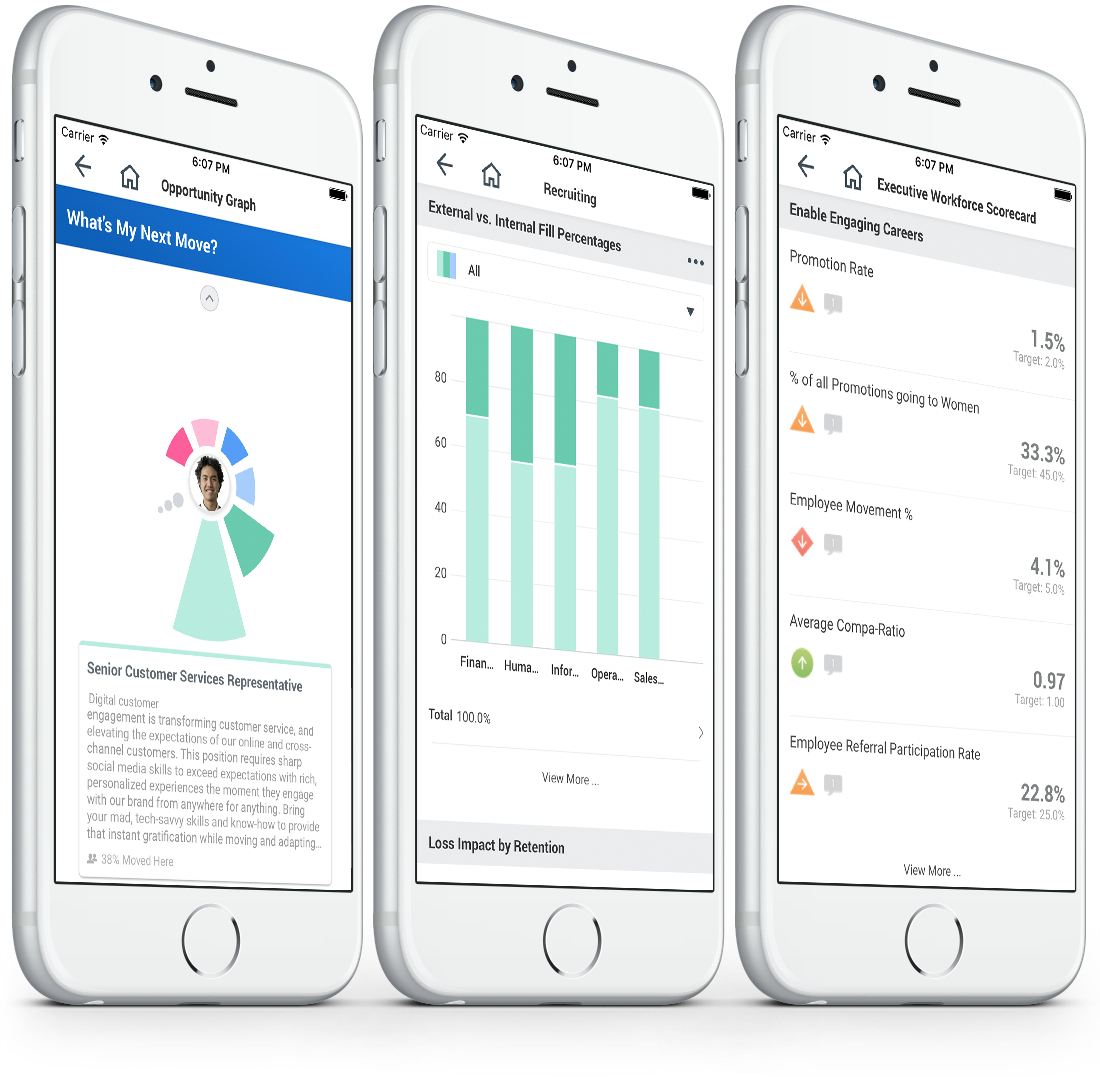
Workday analytics on mobile.

Workday’s workforce planning tools give HR leadership insight into the total cost of workforce from a historical perspective. They can use this information to build predictive models that make better use of the company’s human resources. This includes building hiring pipelines and recruiting models, using popular spreadsheet and project management visualizations to drive hiring projects, and get budget approvals in a timeline that works for hiring.

Oracle’s workforce modeling uses the internal data intelligence tools to understand possible hiring and reorganization needs based on potential business situations. The workforce predictions tool uses business intelligence modeling and data visualization tools to bring insights to all the hiring and employment data that companies already make. And these tools are built for HR teams with little coding knowledge, not for data analysts. HR executives can predict high performance and future openings based on individual metrics, giving the HR team a head start for hiring.

Compensation and financial trending

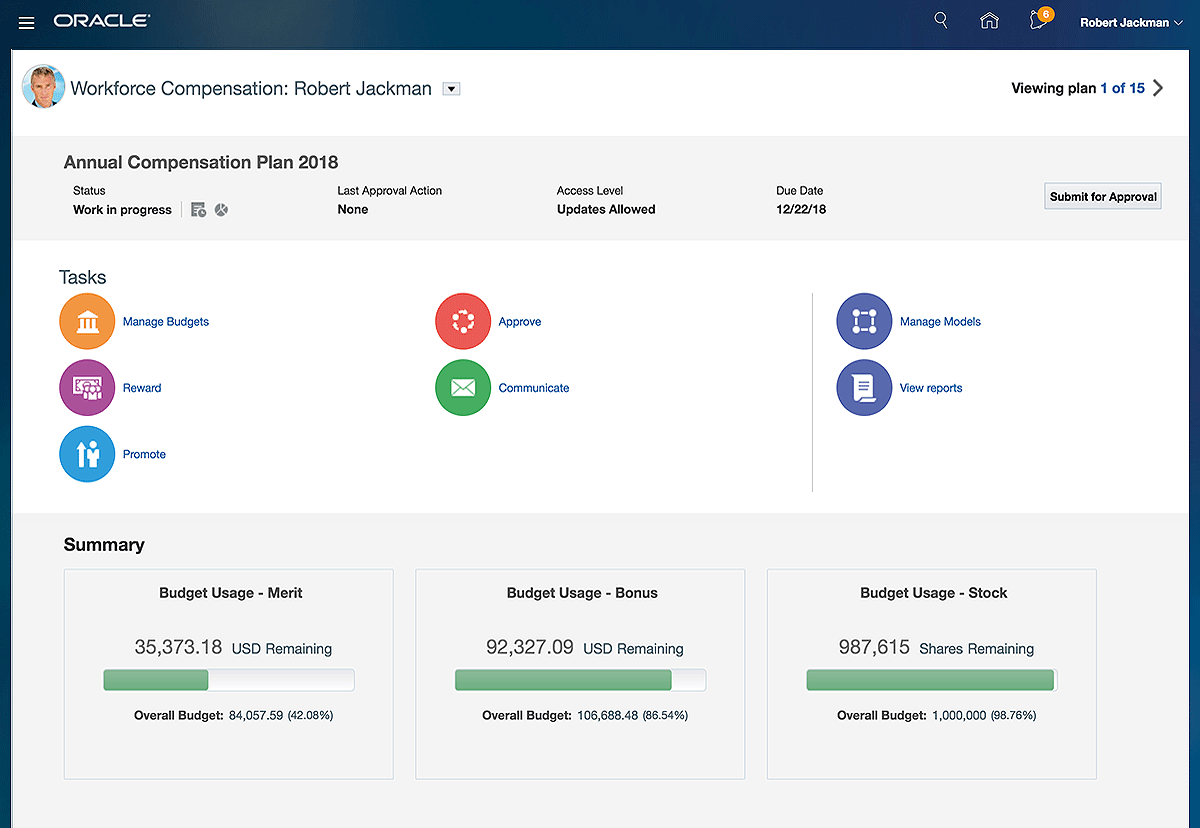
Oracle compensation manager.

Workday and Oracle provide HCM tools that allow corporate leaders to look at human resources within the larger context of the company’s overall financials. This advanced contextual data means executives can make better-informed decisions regarding salaries, hiring, and benefits.

Workday provides industry benchmarks and uses the software’s database analytics to help companies stay competitive in the marketplace and attract top talent. Companies can add compensation incentives like bonuses, awards, and stock options according to custom rules.

Oracle gives executives access to total compensation metrics including base salary, bonuses, and extras. HR teams can control compensation in the administrative portal and design compensation plans based on business strategy.

Benefits and work-life solutions

Workday offers benefits management solutions in the HCM portal. These tools help HR decision-makers understand how enrollments levels and plan offerings affect the overall business financials. Because all of this information is stored in a centralized location, HR teams reduce their reliance on manual audits and lighten their periodic tax reporting work.

Oracle provides a benefits portal for individual employees to sign up for their own benefits, protecting employee privacy and freeing HR pros to complete high-level work. All of the benefits information gets consolidated in the Oracle database, and HR teams can view the cost effectiveness of each benefit plan in dashboards and through advanced reporting tools.

Talent management

Workday and Oracle HCM define talent management differently. Workday uses talent management to define leadership potential, individual skills metrics, and organizational progress toward shared goals. The software has separate modules to manage recruiting, payroll, and employee education. Oracle’s talent management tools include everything along the talent acquisition and retention process including recruiting, compensation, and learning. Although they group the tools in different modules, both systems offer similar tools, so we’ll compare each. learn more from Workday HCM Online Training

Recruiting

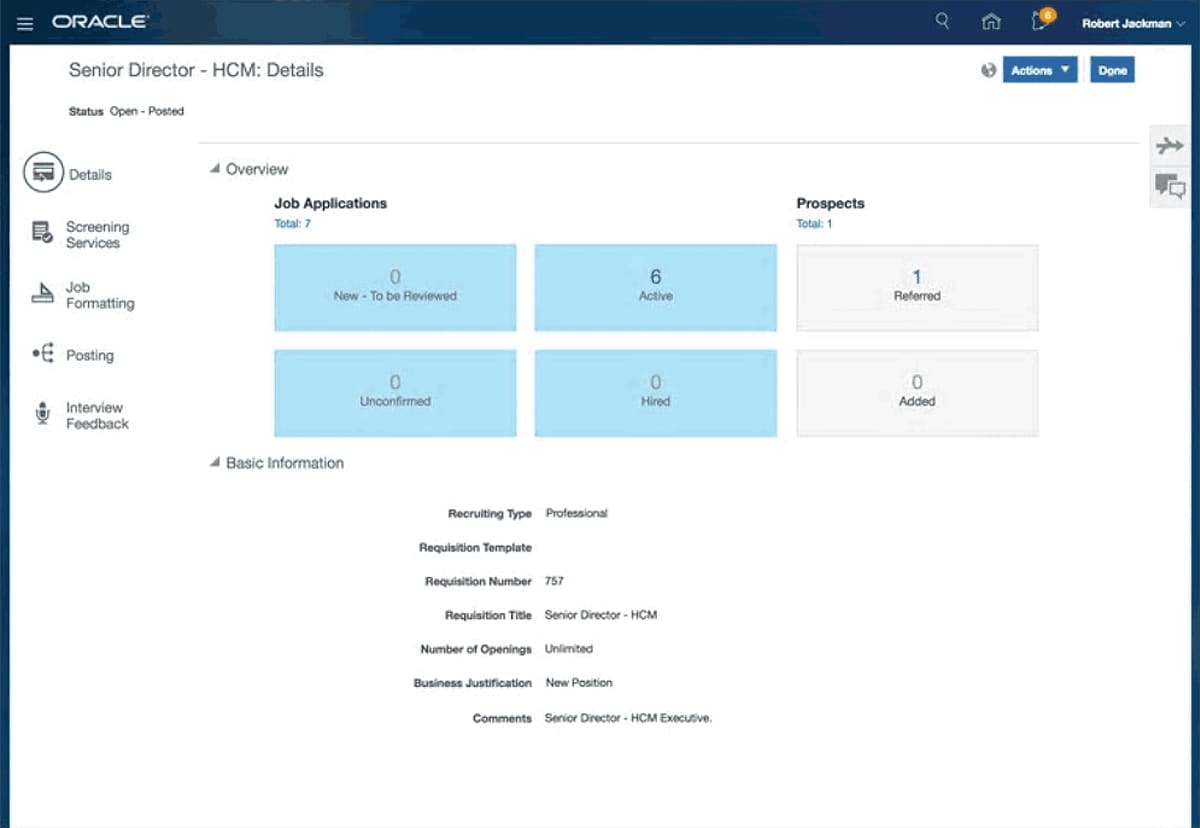
Oracle talent management recruiting.

Workday’s recruiting tools give candidates, recruiters, and HR executives a seamless experience across the tool. Recruiters get a high-level overview of the most important recruitment tasks they need to perform every day and can customize their dashboard with shortcuts to the most important features and tasks.

Workday recruiting connects directly with compensation strategy modules, which streamlines the approval process and gets new hires on-board faster. And with access to performance management tools that pinpoint the most valuable skills and habits of high performers, recruiters can continually iterate and find the best-fit candidates for a changing workforce.

Oracle’s recruiting tools encompass the full employee acquisition cycle from a data-driven and self-service careers site that attracts top candidates to an enterprise onboarding checklist. Split candidates into pools based on skills and keep them all informed with conversational chatbots. And because the recruiting tools run on the Oracle database infrastructure, the entire process is searchable and available for analysis that drives innovation.

Payroll

Workday offers native payroll for the US, Canada, UK, and France, with connections to other payroll providers to manage global payroll. HR pros can use dashboards that show payroll by groups and individuals to understand overview and drill-down metrics. Direct connections with the recruiting software mean that employee data gets entered once and automatically transfers to payroll. Payments and compensation changes are managed directly in the tool, which gives HR more control and cuts out the IT middle-man.

Oracle’s payroll management comes in the human resources module, while compensation tools are included in the talent management module. These modules work seamlessly with one another, however. The Oracle payroll system includes core payroll features that work for the US, Canada, UK, Mexico, and several Middle Eastern countries. Teams can also control payroll outputs to third party processors within the Oracle cloud, or cut checks directly from the system.

Learning

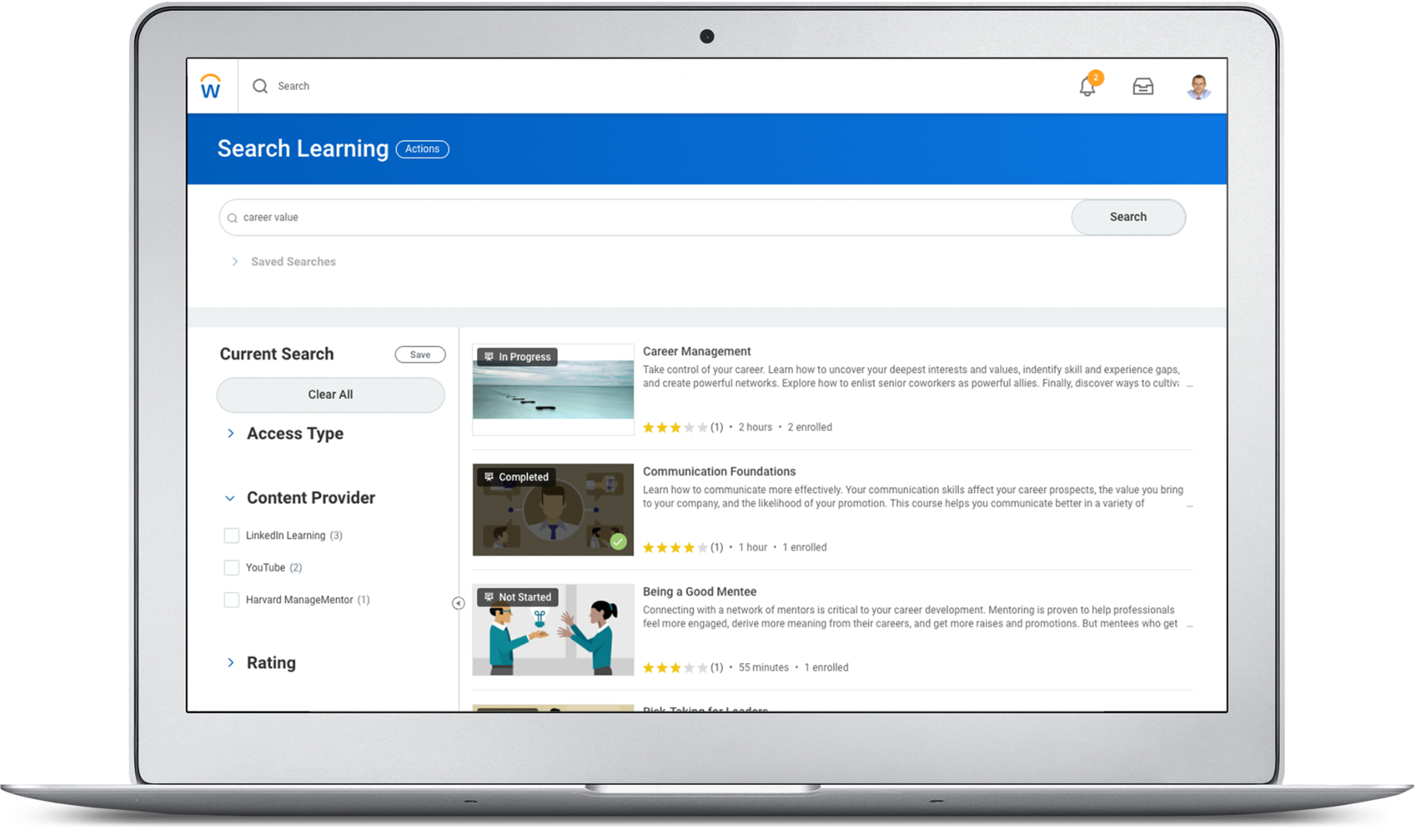
Workday learning.

Workday combines required corporate learning and social-collaborative learning experiences in a single interface. The tools support peer learning, social sharing, quizzes, individual scoring, and content sourced from the Workday Content Cloud to support learning initiatives. And since the learning modules live in the same system with HR and management tools, teams can tie their learning to organizational goals and individual performance management.

Oracle’s learning modules are designed to give managers and individuals the power to create, share, and participate in custom learning experiences. Social and collaborative learning tools bring entire teams together around business goals and organizational priorities. Blended learning across classrooms and online classes makes education interesting and ensures that departements support learners of all types. And HR or managers can set up automated learning experiences to quickly onboard new team members.

To get in-depth knowledge, enroll for a live free demo on Workday Online Training

Design a site like this with WordPress.com
Get started