The Java Stack class, java.util.Stack, is a classical stack data structure. You can push elements to the top of a Java Stack and pop them again, meaning read and remove the elements from the top of the stack.
The Java Stack class actually implements the Java List interface, but you rarely use a Stack as a List – except perhaps if you need to inspect all elements currently stored on the stack.
Please note, that the Java Stack class is a subclass of Vector, an older Java class which is synchronized. This synchronization adds a small overhead to calls to all methods of a Stack. Learn programming skills from Core Java Online Training
Additionally, the Vector class uses several older (no longer recommended) parts of Java, like the Enumeration which is superseded by the Iterator interface. If you want to avoid these issues you can use a Java Deque as a stack instead.
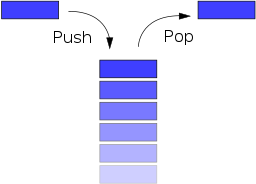
A Stack is a Last In First Out (LIFO) data structure. It supports two basic operations called push and pop. The push operation adds an element at the top of the stack, and the pop operation removes an element from the top of the stack.
Java Stack Methods:
Java Stack extends Vector class with the following five operations only.
- boolean empty(): Tests if this stack is empty.
- E peek(): Looks at the object at the top of this stack without removing it from the stack.
- E pop() : Removes the object at the top of this stack and returns that object as the value of this function.
- E push(E item) : Pushes an item onto the top of this stack.
- int search(Object o) : Returns the 1-based position where an object is on this stack.
Stack Important Points:
- Stack class allow to store Heterogeneous elements.
- Stack work on Last in First out (LIFO) manner.
- Stack allow to store duplicate values.
- Stack class is Synchronized.
- Initial 10 memory location is create whenever object of stack is created and it is re-sizable.
- Stack also organizes the data in the form of cells like Vector.
- Stack is one of the sub-class of Vector. For more info Java Online Course
push() Method:
To add an element to the top of the stack, we use the push() method.
Example:
import java.util.Stack;

class Main {
    public static void main(String[] args) {
        Stack<String> animals= new Stack<>();

        // Add elements to Stack
        animals.push("Dog");
        animals.push("Horse");
        animals.push("Cat");

        System.out.println("Stack: " + animals);
    }
}
pop() Method:
To remove an element from the top of the stack, we use the pop() method.
import java.util.Stack;

class Main {
    public static void main(String[] args) {
        Stack<String> animals= new Stack<>();

        // Add elements to Stack
        animals.push("Dog");
        animals.push("Horse");
        animals.push("Cat");
        System.out.println("Initial Stack: " + animals);

        // Remove element stacks
        String element = animals.pop();
        System.out.println("Removed Element: " + element);
    }
}
Peek at Top Element of Stack:
Stack<String> stack = new Stack<String>();

stack.push("1");

String topElement = stack.peek();
Example:
import java.io.*;
import java.util.*;

class Test
{

    static void stack_push(Stack<Integer> stack)
    {
        for(int i = 0; i < 5; i++)
        {
            stack.push(i);
        }
    }


    static void stack_pop(Stack<Integer> stack)
    {
        System.out.println("Pop :");

        for(int i = 0; i < 5; i++)
        {
            Integer y = (Integer) stack.pop();
            System.out.println(y);
        }
    }


    static void stack_peek(Stack<Integer> stack)
    {
        Integer element = (Integer) stack.peek();
        System.out.println("Element on stack top : " + element);
    }


    static void stack_search(Stack<Integer> stack, int element)
    {
        Integer pos = (Integer) stack.search(element);

        if(pos == -1)
            System.out.println("Element not found");
        else
            System.out.println("Element is found at position " + pos);
    }


    public static void main (String[] args)
    {
        Stack<Integer> stack = new Stack<Integer>();

        stack_push(stack);
        stack_pop(stack);
        stack_push(stack);
        stack_peek(stack);
        stack_search(stack, 2);
        stack_search(stack, 6);
    }
}
To get in-depth knowledge, enroll for a live free demo on Java Online Training
 java programming