TreeMap is Red-Black tree based NavigableMap implementation. It is sorted according to the natural ordering of its keys.
The TreeMap in Java is used to implement Map interface and NavigableMap along with the Abstract Class.
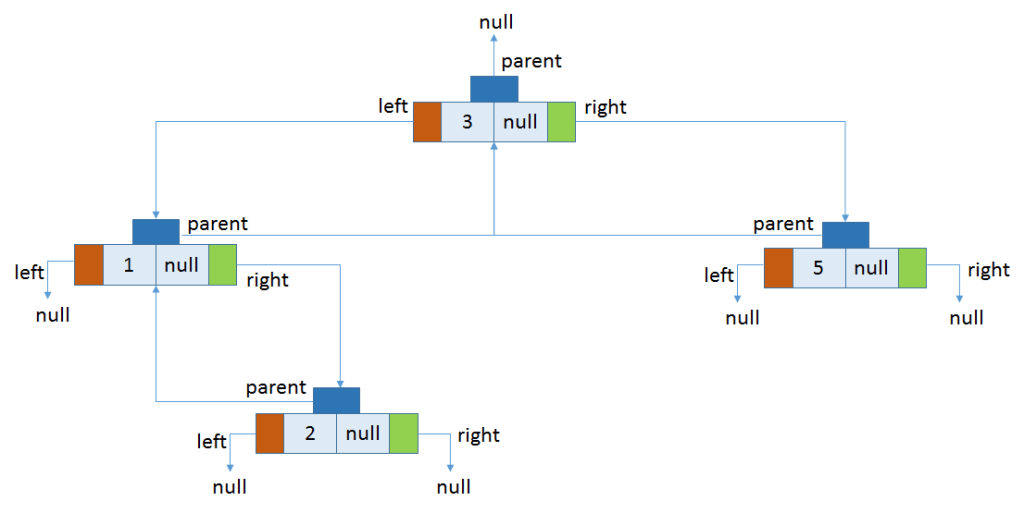
The map is sorted according to the natural ordering of its keys, or by a Comparator provided at map creation time, depending on which constructor is used. This proves to be an efficient way of sorting and storing the key-value pairs.
The storing order maintained by the treemap must be consistent with equals just like any other sorted map, irrespective of the explicit comparators.
The treemap implementation is not synchronized in the sense that if a map is accessed by multiple threads, concurrently and at least one of the threads modifies the map structurally, it must be synchronized externally. For more Java Online Course
Some important features of the treemap are:
- Java TreeMap contains values based on the key. It implements the NavigableMap interface and extends AbstractMap class.
- Java TreeMap contains only unique elements.
- Java TreeMap cannot have a null key but can have multiple null values.
- Java TreeMap is non synchronized.
- Java TreeMap maintains ascending order.
- This class is a member of Java Collections Framework.
- The class implements Map interfaces including NavigableMap, SortedMap and extends AbstractMap
- TreeMap in Java does not allow null keys (like Map) and thus a NullPointerException is thrown. However, multiple null values can be associated with different keys.
- All Map.Entry pairs returned by methods in this class and its views represent snapshots of mappings at the time they were produced. They do not support the Entry.setValue method. Learn more information from java Online Training
TreeMap Hierarchy:
The TreeMap class is declared as following in Java. It extends AbstractMap class and implements NavigableMap interface. Here 'K' is the type of keys and 'V' is the type of mapped values to keys.
public class TreeMap<K,V>
    extends AbstractMap<K,V>
    implements NavigableMap<K,V>, Cloneable, java.io.Serializable
{
    //implementation
}
TreeMap Constructors:
The TreeMap has five types of constructors:
- TreeMap(): creates a new, empty tree map, using the natural ordering of its keys.
- TreeMap(Comparator c): creates a new, empty tree map, ordered according to the given comparator.
- TreeMap(Map map): creates a new tree map containing the same mappings as the given map, ordered according to the natural ordering of its keys.
- TreeMap(SortedMap map): creates a new tree map containing the same mappings and using the same ordering as the specified sorted map. Learn from Java Certification Course
Custom Sorting in TreeMap:
If we’re not satisfied with the natural ordering of TreeMap, we can also define our own rule for ordering by means of a comparator during construction of a tree map. In the example below, we want the integer keys to be ordered in descending order:
public void givenTreeMap_whenOrdersEntriesByComparator_thenCorrect() {
    TreeMap<Integer, String> map =
      new TreeMap<>(Comparator.reverseOrder());
    map.put(3, "val");
    map.put(2, "val");
    map.put(1, "val");
    map.put(5, "val");
    map.put(4, "val");

    assertEquals("[5, 4, 3, 2, 1]", map.keySet().toString());
}
When to use TreeMap in Java
Most of the time HashMap will be enough to use as Map implementation in your program. But if you have some special requirements related to sorting, finding next lower and higher key, work on a submap then you can go for TreeMap.
Example:
import java.util.TreeMap;
import java.util.Set;
import java.util.Iterator;
import java.util.Map;

public class Details {

   public static void main(String args[]) {

      /* This is how to declare TreeMap */
      TreeMap<Integer, String> tmap =
             new TreeMap<Integer, String>();

      /*Adding elements to TreeMap*/
      tmap.put(1, "Data1");
      tmap.put(23, "Data2");
      tmap.put(70, "Data3");
      tmap.put(4, "Data4");
      tmap.put(2, "Data5");

      /* Display content using Iterator*/
      Set set = tmap.entrySet();
      Iterator iterator = set.iterator();
      while(iterator.hasNext()) {
         Map.Entry mentry = (Map.Entry)iterator.next();
         System.out.print("key is: "+ mentry.getKey() + " & Value is: ");
         System.out.println(mentry.getValue());
      }

   }
}
To get in-depth knowledge, enroll for a live free demo on Java online Classes
 java programming