What is Applet?
An applet is a Java program that can be embedded into a web page. It runs inside the web browser and works at client side. An applet is embedded in an HTML page using the APPLET or OBJECT tag and hosted on a web server. For more additional info Java Online Course
Applets are used to make the web site more dynamic and entertaining.
Let’s understand first how many Package does GUI support:
- AWT(Abstract Window Toolkit)
- Swing
Throwback of making GUI application:
Java was launched on 23-Jan-1996(JDK 1.0) and at that time it only supported CUI(Character User Interface) application. But in 1996 VB(Visual Basic) of Microsoft was preferred for GUI programming.
So the Java developers in hurry(i.e within 7 days) have given the support for GUI from Operating System(OS). Now, the components like button,etc. were platform-dependent(i.e in each platform there will be different size, shape button).
But they did the intersection of such components from all platforms and gave a small library which contains these intersections and it is available in AWT(Abstract Window Toolkit) technology but it doesn’t have advanced features like dialogue box, etc.
Important points :
- All applets are sub-classes (either directly or indirectly) of java.applet.Applet class.
- Applets are not stand-alone programs. Instead, they run within either a web browser or an applet viewer. JDK provides a standard applet viewer tool called applet viewer.
- In general, execution of an applet does not begin at main() method.
- Output of an applet window is not performed by System.out.println(). Rather it is handled with various AWT methods, such as drawString().
Life Cycle of an Applet
Four methods in the Applet class gives you the framework on which you build any serious applet −
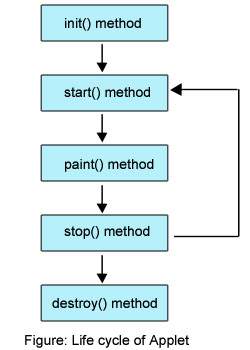
- init − This method is intended for whatever initialization is needed for your applet. It is called after the param tags inside the applet tag have been processed.
- start − This method is automatically called after the browser calls the init method. It is also called whenever the user returns to the page containing the applet after having gone off to other pages.
- stop − This method is automatically called when the user moves off the page on which the applet sits. It can, therefore, be called repeatedly in the same applet.
- destroy − This method is only called when the browser shuts down normally. Because applets are meant to live on an HTML page, you should not normally leave resources behind after a user leaves the page that contains the applet.
- paint − Invoked immediately after the start() method, and also any time the applet needs to repaint itself in the browser. The paint() method is actually inherited from the java.awt.
Example:
import java.awt.*;
import java.applet.*;
public class Simple extends Applet
{
 public void paint(Graphics g)
 {
  g.drawString("A simple Applet", 20, 20);
 }
}
To get in-depth knowledge, enroll for a live free demo on Java Online Training
Every Applet application must import two packages – java.awt and java.applet.
java.awt.* imports the Abstract Window Toolkit (AWT) classes. Applets interact with the user (either directly or indirectly) through the AWT.
The AWT contains support for a window-based, graphical user interface. java.applet.* imports the applet package, which contains the class Applet. Every applet that you create must be a subclass of Applet class.
The class in the program must be declared as public, because it will be accessed by code that is outside the program.Every Applet application must declare a paint() method. This method is defined by AWT class and must be overridden by the applet.
The paint() method is called each time when an applet needs to redisplay its output. Another important thing to notice about applet application is that, execution of an applet does not begin at main() method.
In fact an applet application does not have any main() method.
Difference between Applications and Applets
| Applications | Applets |
| An application runs stand-alone. | An applet program runs under the control of browser. |
| It can access any data or software available on the system. | It cannot access anything on the system except browser’s service. |
| Execution start from the main() method. | Execution start from the init() method because main() is not available. |
| It can read and write to the file system. | Cannot read and write to the file systems. |
| Does not provide any security. | An applet provides the security features. |
| Application run using Java interpreter. | It runs using applet viewer or on web browser. |
Java Architecture:
Java applets are essentially java window programs that can run within a web page.Applete programs are java classes that extend that java.applet.Applet class and are enabaled by reference with HTML page.
You can observed that when applet are combined with HTML, thet can make an interface more dynamic and powerful than with HTML alone. While some Applet do not more than scroll text or play movements, but by incorporating theses basic features in webpage you can make them dynamic.
These dynamic web page can be used in an enterprise application to view or manipulate data comming from some source on the server. The Applet and there class files are distribute through standard HTTP request and therefore can be sent across firewall with the web page data.
Applete code is referenced automatically each time the user revisit the hosting website. Therefore keeps full application up to date on each client desktop on which it is running.
 java programming